 Sign In
APA Title Page Format Explained: Student vs Professional Paper (With Examples)
If you're writing a paper for a college course or submitting research for publication, the title page is the first thing your reader sees. APA Style 7th edition uses two different title page formats, one for student papers and one for professional papers, and they aren't interchangeable. This guide shows what each format looks like, side by side, with annotated examples and a quick decision tree to help you choose the right one.
Quick Answer: Which APA Title Page Format Do You Use?
Submitting to an instructor for a class? Use the student format.
Submitting to a journal for publication? Use the professional format.
Not sure which one your instructor wants? Default to the student format unless they specifically request the professional version. APA's own guidance recommends this.
APA Title Page Format Examples (Student and Professional)
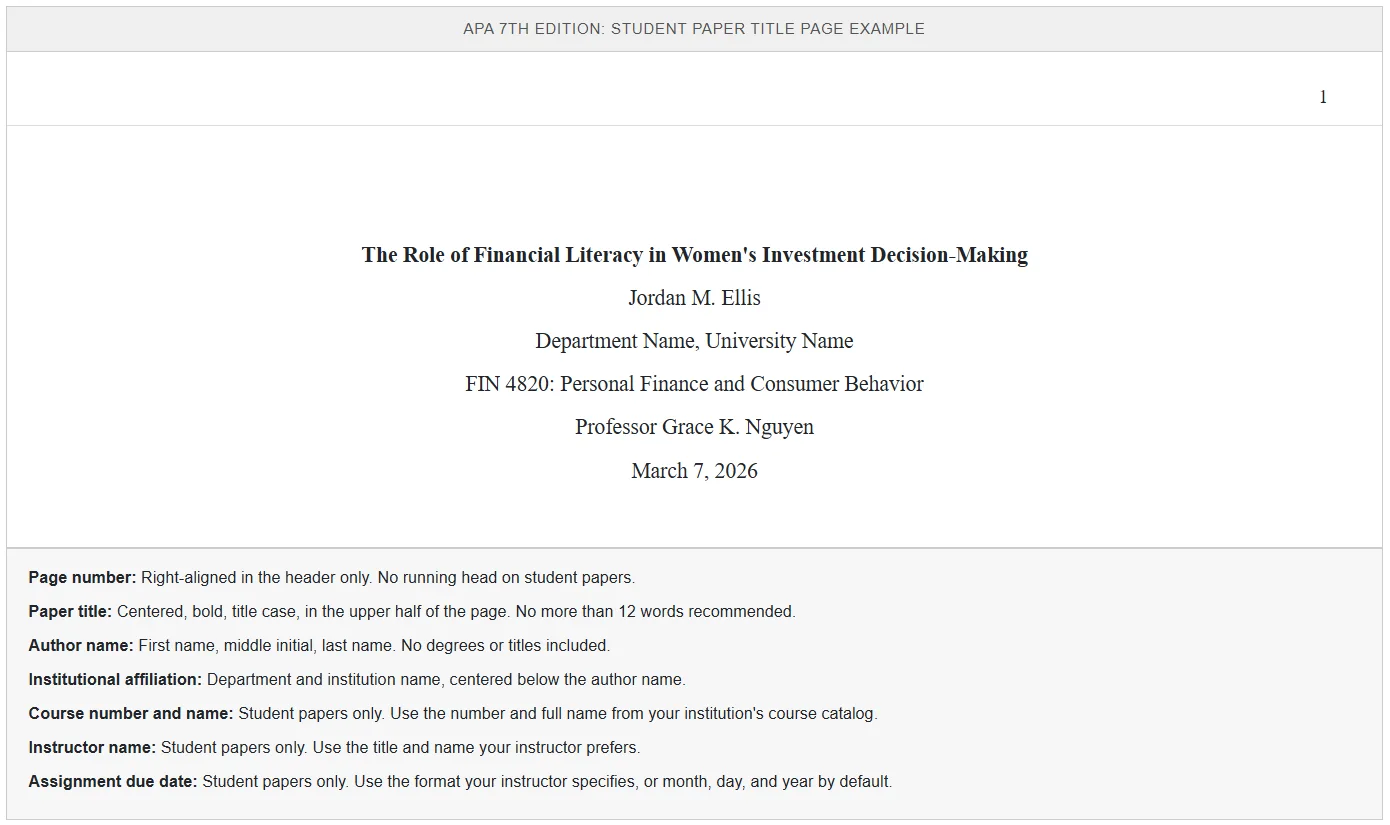
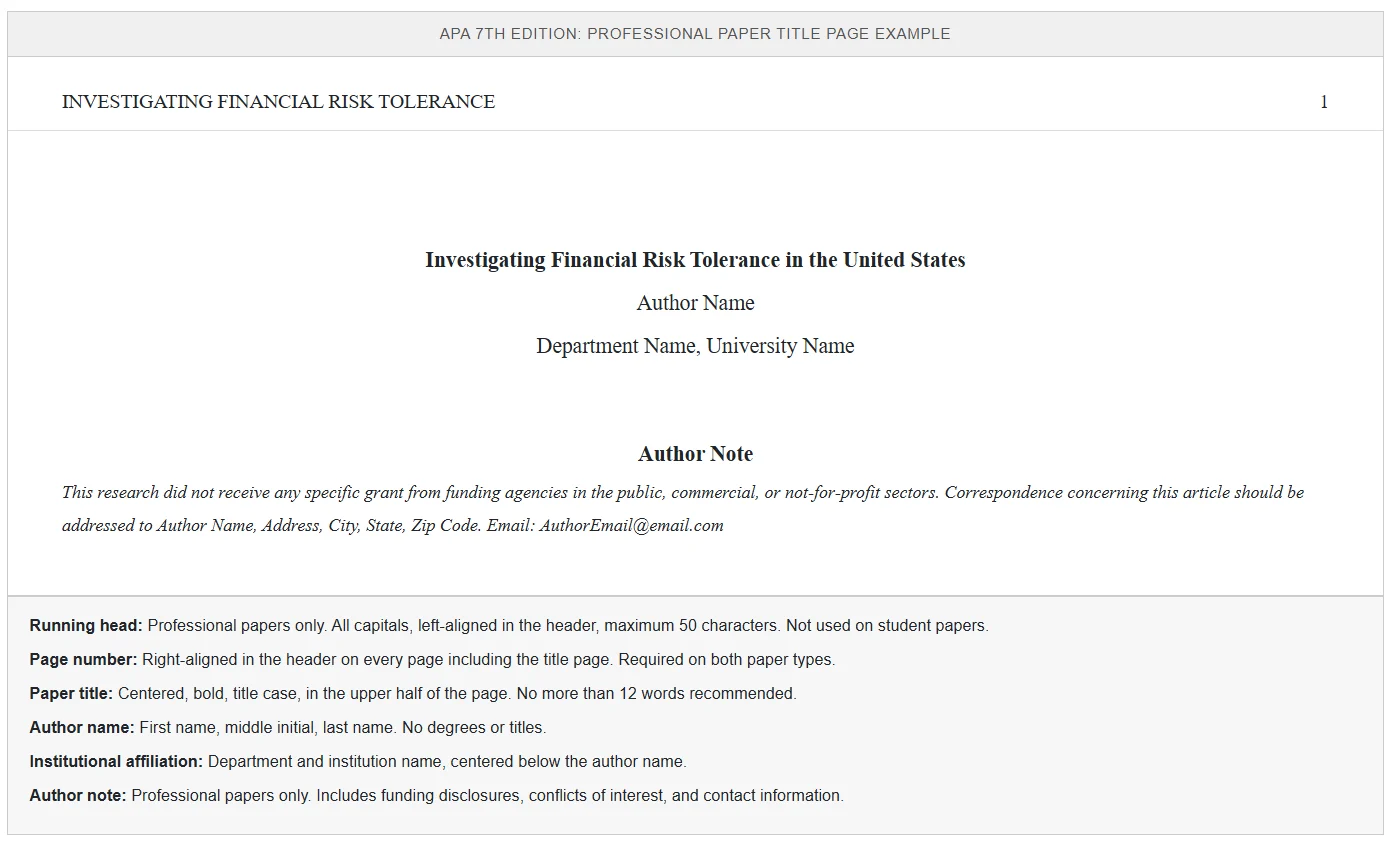
The two annotated examples below show every required element of each format. The student paper goes first because it's the more common use case.
Student Paper Title Page Example
Professional Paper Title Page Example
APA Student vs Professional Title Page: Side-by-Side
The table below shows which elements appear on each format at a glance. The two formats share five elements and differ on five.
| Element | Student Paper | Professional Paper |
|---|---|---|
| Paper title (bold, centered, upper half) | Required | Required |
| Author name (no titles or degrees) | Required | Required |
| Institutional affiliation | Required | Required |
| Department name | Optional | Optional |
| Page number in header | Required | Required |
| Course number and name | Required | Not included |
| Instructor name | Required | Not included |
| Assignment due date | Required | Not included |
| Running head (all caps, max 50 characters) | Not required | Required |
| Author note (ORCID, disclosures, contact) | Not included | Required |
APA Title Page Quick Checklists
Use these checklists when you're building your title page. Each format has its own list, in the order the elements appear on the page from top to bottom.
Student Paper Title Page Checklist
- Page number in upper right corner of header (number 1)
- Paper title, bold, centered, in upper half of the page
- Author name (first name, middle initial, last name) below the title
- Institutional affiliation below the author name
- Course number and name (for example: PSY 301: Research Methods in Psychology)
- Instructor name in the form they prefer
- Assignment due date
- All text centered and double spaced throughout
Professional Paper Title Page Checklist
- Running head in upper left of header, all capital letters, 50 characters or fewer
- Page number in upper right corner of same header line
- Paper title, bold, centered, in upper half of the page
- Author name (first name, middle initial, last name) below the title
- Institutional affiliation below the author name
- Author note in the lower half of the page, left-aligned, with ORCID iDs, affiliation changes, disclosures, acknowledgements, and corresponding author contact information
- "Author Note" label centered and bold
- All text double spaced throughout
Why APA Has Two Different Title Page Formats
APA Style 7th edition, released in 2019, introduced a formal distinction between student papers and professional papers. Before this change, one set of rules applied to everyone, and student papers were expected to mirror journal manuscript conventions like the running head. The 7th edition simplified things for students while keeping the full set of requirements for journal submissions.
Older guides on the web still describe the 6th edition rules, and following them is one of the most common formatting mistakes students make. If a source tells you a student paper needs a running head, it's outdated. For a deeper component-by-component walkthrough of every field on each format, see our complete APA style title page guide.
General Formatting Rules for Both APA Title Pages
Whether you're writing a student paper or a professional one, the following rules apply to your title page.
- Font. Use a standard readable font such as 12-point Times New Roman, 11-point Calibri, 11-point Arial, or 11-point Georgia. Use the same font throughout the entire paper.
- Spacing. Double-space the entire title page with no extra space added between paragraphs or sections.
- Margins. One inch on all four sides.
- Alignment. All text on the title page is centered horizontally, with the exception of the running head and page number in the header (left and right aligned, respectively) and the author note on professional papers (left aligned).
- Page count. The title page is page 1. The number 1 appears in the upper right corner of the header.
Common Mistakes on APA Title Pages
Even students who are familiar with APA format frequently make the same title page errors. Watch for these.
- Using 6th edition rules instead of 7th edition. The most common mistake. Student papers no longer require a running head, and three-or-more-author citations use "et al." from the first mention.
- Adding a running head to a student paper. The running head is professional-only unless your instructor specifically requests it.
- Forgetting to bold the title. Both formats require a bold title in title case.
- Including degree credentials after the author name. No PhD, MD, MS, Dr., or Prof. on either format.
- Centering the page number on the page. The page number sits in the right-aligned header, not in the body of the page.
- Treating the title page as an afterthought. Format it carefully at the start using these checklists. Reworking it at the end invites errors.
Frequently Asked Questions
Is there an official APA title page template I can download?
Yes. The American Psychological Association provides free downloadable sample papers for both student and professional formats on the official APA Style website. These are annotated PDFs that show every required element with explanations. Many universities also distribute Word document templates that match APA 7th edition requirements. Always confirm that any template you use reflects the 7th edition rules, since older templates with running heads on student papers are still widely circulated.
Do all journals use the standard APA professional title page format?
No. Many journals that nominally follow APA style have their own additional requirements. Some require a structured abstract on the title page, some require keywords, and some require the corresponding author's information in a different location. Always check the journal's submission guidelines before formatting your title page, and follow journal-specific requirements when they conflict with the standard APA format.
Should the running head match the paper title exactly?
No. The running head is an abbreviated version of the title, not a copy of it. It should capture the main idea of the paper in 50 characters or fewer, including spaces and punctuation. For example, a paper titled "The Effects of Sleep Deprivation on Academic Performance in Undergraduate Students" might use "SLEEP DEPRIVATION AND ACADEMIC PERFORMANCE" as the running head.
Where does the title go on an APA title page?
The title goes in the upper half of the page, centered horizontally, typically three to four lines down from the top margin. It shouldn't be in the vertical center of the page. The title is bold, double spaced, and in title case, with one to two lines preferred.
Can I use an APA title page format for a non-APA paper?
It's generally better to use the format that matches your citation style. MLA, Chicago, and other style guides have their own title page or first-page conventions that differ from APA. Using an APA title page on an MLA or Chicago paper signals to instructors and reviewers that the writer hasn't matched format to citation system, which can affect how the paper is evaluated.
Does the title page need an abstract?
No. The title page stands alone as the first page of the document. The abstract, when required, appears on the second page with the heading "Abstract" centered and bold. Student papers don't typically require an abstract unless the instructor requests one.
What font size should the title use on an APA title page?
The title uses the same font size as the rest of the paper. APA 7th edition doesn't require a larger font size for the title. The title is distinguished by being bold, centered, and positioned in the upper half of the page rather than by being larger than the body text.
Related APA Formatting Guides
The title page is the first formatting decision you make, but it's not the only one. These guides cover the most common APA formatting requirements.
- APA style title page guide. A detailed component-by-component walkthrough of every field on both title page types.
- APA running head formatting. When you need one, how to format it, and the most common errors.
- APA vs MLA format. Key differences between the two most common academic style guides and when each is used.
- APA citation guide. In-text citations, reference list formatting, and the most common citation types.
- How to use et al. in APA. When to abbreviate multi-author citations and how to format them correctly.
When to Get a Second Set of Eyes on Your APA Paper
APA format is detailed, and even careful writers miss things. If you're submitting a thesis, dissertation, or paper for publication, having a professional editor review your formatting before submission can save you from corrections that delay the process. Editor World's academic editing service covers APA formatting review alongside substantive editing of grammar, clarity, and citation consistency, so your paper is correct at every level before it reaches your committee or journal.
Formatting errors on a title page don't usually change the quality of the research behind a paper, but they do create an impression before your reader gets to your first paragraph. To see who would be working on your document, you can choose your own editor from the Editor World roster, or request a free sample edit of up to 300 words before committing to a full edit.
This article was reviewed by the Editor World academic team. Editor World, founded in 2010 by Patti Fisher, PhD, provides professional editing and proofreading services for students, academics, and researchers worldwide.