 Sign In
APA Title Page: A Complete Guide for Students and Professionals
Updated May 2026.
The first page of your paper is the first thing a reader, instructor, or journal reviewer sees. Getting it right is straightforward once you understand two things. First, which format applies to your paper (student or professional). Second, what goes in each field. This guide walks through every element. Examples are included for both formats, based on APA 7th edition.
Quick Answer: Which Format Do You Need?
Student format.
Use this for class assignments and any paper submitted to an instructor. Includes course name, instructor name, and due date. No running head.
Professional format.
Use this for papers submitted to academic journals. Includes a running head and a full author note with ORCID iDs, disclosures, and contact information. No course or instructor details.
Both formats share four elements:
page number, bold centered title in the upper half of the page, author name without titles or degrees, and institutional affiliation.
Required Elements: Student vs. Professional Side-by-Side
Use this table to quickly check which elements your format requires.
| Element | Student Paper | Professional Paper |
|---|---|---|
| Page number | Upper right | Upper right |
| Running head | Not required | Required (upper left, max 50 characters) |
| Bold centered title | Required | Required |
| Author name | Required (no titles or degrees) | Required (no titles or degrees) |
| Institutional affiliation | Required | Required |
| Course name | Required | Not included |
| Instructor name | Required | Not included |
| Due date | Required | Not included |
| Author note | Not required | Required (ORCID iDs, disclosures, contact) |
Student vs. Professional: Which Format Do You Need?
APA Style 7th edition has two different formats for the cover page. Which one you use depends on why you're writing the paper.
- Student format.
Use this for class assignments, coursework, and papers submitted to an instructor. - Professional format.
Use this for papers submitted to academic journals for publication.
The two formats share some elements but differ in several important ways. The sections below cover the shared elements first. The format-specific elements for student and professional papers come next.
Elements That Appear on Both Formats
Start here. These four elements are required regardless of which format you're using.
1. Page Number
Place the number 1 in the upper right corner of the page. Every page in your paper is numbered, starting here.
2. Title of the Paper
The title of the paper goes in the upper half of the page, not vertically centered. Follow these rules.
- Center the title of the paper horizontally.
- Bold it.
- Double space it.
- Use title case: capitalize the first letter of each major word.
- Keep it concise. One to two lines is ideal.
- Leave out abbreviations and filler words.
3. Author Name
Write your full name directly below the title of the paper. Follow these rules.
- Use first name, middle initial, and last name.
- Don't include titles or degrees. No PhD, MD, Dr., or Prof.
- For multiple authors, list them in order of contribution.
- If all authors contributed equally, list them alphabetically by last name.
- If only some contributed equally, use an asterisk and add a note below the author list explaining this.
- For two authors, separate names with "and." For three or more, use commas and "and" before the last name.
4. Institutional Affiliation
Write the department and institution where the research was conducted, directly below the author name.
- If all authors share the same affiliation, list it once.
- If authors have different affiliations, use superscript numbers on the author line to connect each author to their institution.
Student Format: Additional Elements
If you're submitting a class assignment, add these three elements below the institutional affiliation. All are centered and double spaced.
- Course name and number.
For example: PSY 301: Research Methods in Psychology. - Instructor name.
Use the name your instructor prefers, including any title they use. - Due date.
Write the date the assignment is due, not the date you submitted it.
Student papers don't include a running head or an author note. These were required in APA 6th edition. They're no longer required for student work in the 7th edition.

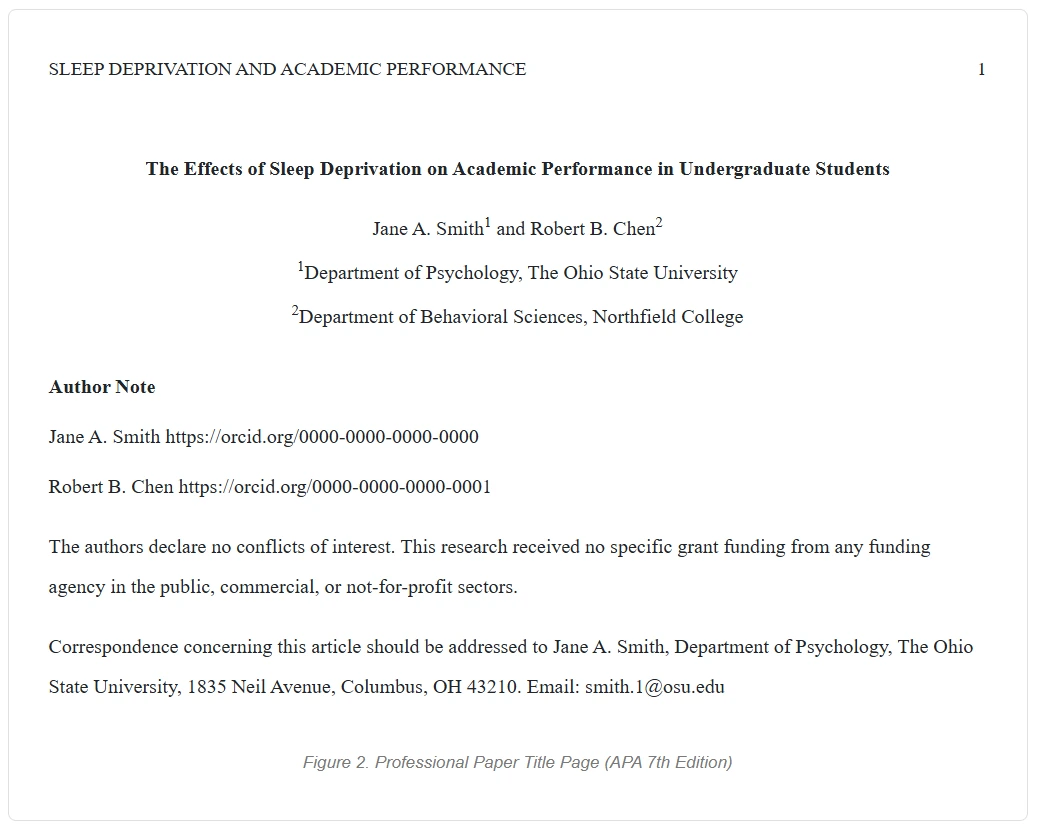
Professional Format: Additional Elements
If you're submitting a paper to a journal, add these two elements that student papers don't include.
Running Head
A running head is a short version of the title of the paper. It appears in the header of every page.
- Place it flush left in the header of the title page.
- Write it in ALL CAPITAL LETTERS.
- Keep it to 50 characters or fewer, including spaces and punctuation.
- The page number sits in the upper right corner of the same header line.
For example, take a paper titled "The Effects of Sleep Deprivation on Academic Performance in Undergraduate Students." The running head would be: SLEEP DEPRIVATION AND ACADEMIC PERFORMANCE.
Author Note
The author note appears in the lower half of the page, below the institutional affiliations. It's left-aligned, not centered. Include the following, each in a separate paragraph in this order.
- ORCID iD.
Each author's name followed by their ORCID URL (https://orcid.org/xxxx-xxxx-xxxx-xxxx). - Affiliation changes.
Note if any author's affiliation changed between when the research was conducted and when the paper was submitted. - Disclosures.
Any conflicts of interest, grant funding, financial support, study registrations, or data sharing statements. - Acknowledgements.
Brief thanks to anyone who contributed but is not listed as an author. - Contact information.
The corresponding author's full mailing address and email.
The label "Author Note" is centered and bold. Each paragraph within the note is left-aligned and indented on the first line. See the APA's author note guidelines for full details.
Six Common Formatting Mistakes
These are the errors that come up most often, in student and professional papers alike.
- Adding your degree after your name.
Leave it out entirely. No PhD, MD, MS, Dr., or Prof. in either format. - Vertically centering everything on the page.
The title of the paper goes in the upper half of the page, not the middle. Starting your content too far down the page is one of the most common layout errors. - Using single spacing.
Every element (title, name, affiliation, course details, author note) should be double spaced. - Forgetting the running head on a professional paper.
It's required for journal submissions. The running head belongs in the header flush left, in all capitals, 50 characters or fewer. - Including course and instructor details on a professional paper.
These belong only on student papers. Remove them from anything you're submitting to a journal. - Applying APA 6th edition rules.
Two key things changed in the 7th edition. Student papers no longer need a running head. Sources with three or more authors now use the abbreviated "et al." form from the very first in-text citation. The 6th edition required listing all authors on first mention.
Can You Include an Image on the Cover Page?
APA doesn't provide guidelines for including images on the cover page. It's generally considered unprofessional to do so. The page exists to provide information, not decoration. If you do include an image, for example if your institution requires a logo, add a note directly beneath it explaining its source. Don't label it as a figure.
Helpful Resources
For student papers, the Purdue OWL APA formatting guide is one of the most comprehensive free references available. For professional papers, check the specific journal you're submitting to first. Many journals have formatting requirements that differ slightly from the standard APA guidelines. The APA also provides official annotated sample papers in professional format. These are useful when preparing a journal submission.
Frequently Asked Questions
What goes on a student APA title page?
Seven elements appear on the cover page of a student paper, in this order. First, the page number in the upper right. Second, the bold centered title of the paper. Third, the author name without degrees. Fourth, the institutional affiliation. Fifth, the course name and number. Sixth, the instructor name. Seventh, the assignment due date. All text is centered and double spaced. Student papers don't include a running head or an author note.
What goes on a professional APA title page?
A professional cover page has six elements. First, the running head in the upper left header. Second, the page number in the upper right header. Third, the bold centered title of the paper. Fourth, the author name without degrees. Fifth, the institutional affiliation. Sixth, a complete author note. The author note includes ORCID iDs, any affiliation changes, conflict of interest disclosures, funding acknowledgements, and the corresponding author's contact information.
Do student papers need a running head?
No. APA 7th edition removed this requirement for student papers. A running head is only required for professional papers submitted for publication. This is one of the most significant changes from the 6th edition. The 6th edition required a running head on all papers. Student writers should still follow any specific requests from their instructor or institution.
Can I write "Dr." or "PhD" after my name?
No. APA requires names without academic titles or credentials in both student and professional formats. Use first name, middle initial, and last name only.
Where exactly does the title of the paper go?
The title of the paper goes in the upper half of the page, centered horizontally. It typically sits three to four lines down from the top margin. The title shouldn't be in the vertical center. Bold it. Double space it. Keep it to one or two lines. Use title case and avoid abbreviations.
What is an author note and do I need one?
An author note is a block of information that appears in the lower half of a professional paper. It includes ORCID iDs, affiliation changes, conflict of interest disclosures, funding acknowledgements, and the corresponding author's contact details. It's required for professional papers submitted to journals. Student papers don't include one.
What font and font size should I use?
APA 7th edition allows several fonts. Common acceptable choices include 12-point Times New Roman, 11-point Calibri, 11-point Arial, and 11-point Georgia. Use the same font throughout the entire paper. Most modern word processors default to one of these acceptable fonts.
Does the cover page count as page 1?
Yes. The cover page is page 1 of the paper. The page number 1 appears in the upper right corner. Every subsequent page is numbered consecutively, including the abstract, body, references, and any appendices.
When to Get Help with APA Formatting
Correct formatting is an important first step. It's just one part of producing a strong academic paper. The cover page sets the tone. But reviewers and instructors evaluate the writing itself just as carefully. You may have spent weeks getting your APA formatting precise. If the writing hasn't received the same attention, an experienced editor can help. An editor addresses grammar, clarity, citation consistency, and APA style compliance throughout the document.
Editor World provides professional academic editing for students, graduate researchers, and faculty. We work in APA, MLA, Chicago, and other major citation styles. Every editor is a native English speaker with an advanced degree in their field. Every document is reviewed by a real person, never by AI. To see who would be working on your paper, choose your own editor from the Editor World roster. You can also request a free sample edit of up to 300 words before committing to a full edit.
This article was reviewed by the Editor World academic team. Editor World, founded in 2010 by Patti Fisher, PhD, provides professional editing and proofreading services for students, academics, and researchers worldwide. BBB A+ accredited since 2010 with 5.0/5 Google Reviews and 5.0/5 Facebook Reviews.